关于网站归档页面,很多网站都已经在用了,效果都是很赞,最近看牧风发的一个教程,也是关于归档页面的,不同的是他才用了左侧时间导航的形式,非常美观和方便,然后我根据他的版本改了下样式,就成了我现在的归档页面,见Archives。下面分享下这个代码吧。
来源:牧风
效果:
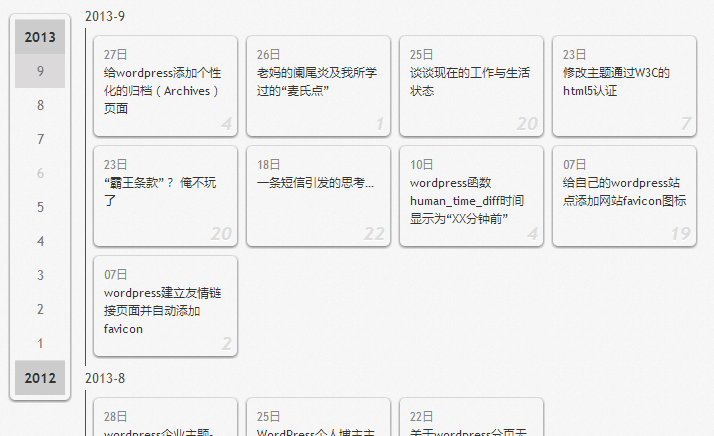
PHP部分
<div id="archives" class="cobmwarchives">
    <div id="archives-content">
    <?php
        $the_query = new WP_Query( 'posts_per_page=-1&ignore_sticky_posts=1' );
        $year=0; $mon=0; $i=0; $j=0;
        $all = array();
        $output = '';
        while ( $the_query->have_posts() ) : $the_query->the_post();
            $year_tmp = get_the_time('Y');
            $mon_tmp = get_the_time('n');
            $y=$year; $m=$mon;
            if ($mon != $mon_tmp && $mon > 0) $output .= '</div></div>';
            if ($year != $year_tmp) { // 输出年份
                $year = $year_tmp;
                $all[$year] = array();
            }
            if ($mon != $mon_tmp) { // 输出月份
                $mon = $mon_tmp;
                array_push($all[$year], $mon);
                $output .= "<div class='archive-title clearfix' id='arti-$year-$mon'><h3>$year-$mon</h3><div class='archives archives-$mon' data-date='$year-$mon'>";
            }
            $output .= '<div class="brick cobmwarchives"><a target="_blank" href="'.get_permalink() .'"><span class="time">'.get_the_time('d日').'</span>'.get_the_title() .'</a>
            <span class="arch-day">'. get_comments_number('0', '1', '%') .'</span></div>';
        endwhile;
        wp_reset_postdata();
        $output .= '</div></div>';
        echo $output;

        $html = "";
        $year_now = date("Y");
        foreach($all as $key => $value){// 输出 左侧年份表
            $html .= "<li class='year' id='year-$key'><a href='#' class='year-toogle' id='yeto-$key'>$key</a><ul class='monthall'>";
            for($i=12; $i>0; $i--){
                if($key == $year_now && $i > $value[0]) continue;
                $html .= in_array($i, $value) ? ("<li class='month monthed' id='mont-$key-$i'>$i</li>") : ("<li class='month'>$i</li>");
            }
            $html .= "</ul></li>";
        }
    ?>
    </div>
    <div id="archive-nav">
        <ul class="archive-nav cobmwarchives"><?php echo $html;?></ul>
    </div>
</div>
css部分
/*archives*/
#archives {zoom: 1}
.cobmwarchives{padding:10px;text-shadow: none;box-shadow: 0 1px 4px rgba(0, 0, 0, 0.65);border-radius: 5px;position: relative;
    -moz-border-radius: 5px;-webkit-border-radius: 5px;margin-bottom: 10px;}
    #archives:after {clear: both;display: block;visibility: hidden;height: 0!important;content: " ";font-size: 0!important;
    line-height: 0!important}
    #archives-content {float: right;width: 630px}   /*宽度自行修改*/
    #archive-nav {float: left;width: 50px}
    .archive-nav{display:block;position:fixed;width:50px;padding:5px;text-align:center;margin-top: 10px;}
    .year{border-top:1px solid #ddd}
    .month{color:#ccc;padding:5px;cursor:pointer}
    .month.monthed{color:#777}
    .month.selected,.month:hover{background:#DBD9D9}
    .monthall{display:none}
    .year.selected .monthall{display:block}
    .year-toogle{display:block;padding:5px;text-decoration:none;background:#CCC;color:#333;font-weight:bold}
    .archive-title{}
    .brick{float: left;display: inline;width: 143px;height: 100px;margin: 0 10px 10px 0;color: #ccc;font-size: 12px;
        margin-bottom: 10px;position: relative;padding: 0;}
    .brick:hover {background: #ddd;}
    .archives{overflow: hidden;border-left: 1px solid #504F4F;padding-top: 8px;padding-left: 8px;list-style: none;}
    .archives a{position:relative;display:block;padding:10px;color:#333;font-style:normal;line-height:18px;height: 78px;}
    .time{color:#888;padding-right:10px;display: block;}
    #archives h3{}
    .arch-day {position: absolute;bottom: 0;right: 5px;font-size: 18px;font-weight: bold;color: #DDD;font-style: italic;
        text-shadow: 0 1px 0 white;}
    .brick:hover .arch-day {color: #7A7A7A;}
js部分
jQuery(document).ready(function($) {
    var old_top = $("#archives").offset().top,
        _year = parseInt($(".year:first").attr("id").replace("year-", ""));
    $(".year:first, .year .month:first").addClass("selected");
    $(".month.monthed").click(function() {
        var _this = $(this),
            _id = "#" + _this.attr("id").replace("mont", "arti");
        if (!_this.hasClass("selected")) {
            var _stop = $(_id).offset().top - 10,
                _selected = $(".month.monthed.selected");
            _selected.removeClass("selected");
            _this.addClass("selected");
            $("body, html").scrollTop(_stop)
        }
    });
    $(".year-toogle").click(function(e) {
        e.preventDefault();
        var _this = $(this),
            _thisp = _this.parent();
        if (!_thisp.hasClass("selected")) {
            var _selected = $(".year.selected"),
                _month = _thisp.children("ul").children("li").eq(0);
            _selected.removeClass("selected");
            _thisp.addClass("selected");
            _month.click()
        }
    });
    $(window).scroll(function() {
        var _this = $(this),
            _top = _this.scrollTop();
        if (_top >= old_top + 10) {
            $(".archive-nav").css({
                top: 10
            })
        } else {
            $(".archive-nav").css({
                top: old_top + 10 - _top
            })
        }
        $(".archive-title").each(function() {
            var _this = $(this),
                _ooid = _this.attr("id"),
                _newyear = parseInt(_ooid.replace(/arti-(\d*)-\d*/, "$1")),
                _offtop = _this.offset().top - 40,
                _oph = _offtop + _this.height();
            if (_top >= _offtop && _top < _oph) {
                if (_newyear != _year) {
                    $("#year-" + _year).removeClass("selected");
                    $("#year-" + _newyear).addClass("selected");
                    _year = _newyear
                }
                var _id = _id = "#" + _ooid.replace("arti", "mont"),
                    _selected = $(".month.monthed.selected");
                _selected.removeClass("selected");
                $(_id).addClass("selected")
            }
        })
    })
});
可能这个css不适用你的主题,请适当进行调整以达到最佳效果,比如css中的第7行宽度需要根据主题情况自己调整下,也可参考牧风的css样式。
怕有些人看不懂这个教程怎么用,在这里顺便提一下吧。
- 复制自己主题文件夹下的page.php文件放在主题目录,命名随意(例如我命名为archives.php)
- 用Sublime Txet等代码编辑器(如果没有就用记事本吧--囧--)打开文件,在顶部加上<?php /* Template Name: archives */ ?>这句代码
- 在编辑页面中找到代码的正文部分,一般在 id="content" 的div里面(这个怎么解释呢...),然后用我上面写的php部分替换进去
- 打开style.css 添加css部分
- 新建一个js文件,把上面的js代码粘贴进去,并在archives中引用
- 在wp后台新建一个页面,模板选择为archives
- 搞定收工...
其实我发这篇文章是来试试代码高亮的... 传送门:https://huilang.me/code/
谢谢分享!我捯饬捯饬!
第一次看打“捯饬”这个词,百度了下才知道什么意思
哈哈 这东西我喜欢~~~不过现在用的主题自带有归档模板了~
没见你把归档页面展示出来哦
有展示出来哦= =在右侧栏最下面的那块文章归档里,没有放到导航栏
嗯 看到了 和传统的不一样 这个是小工具的把
小工具也是放在主题中的,算是其中一个模板吧,修改一下也就变成你这种了..
其实小工具的归档和这个归档还是有很大的区别的...小工具的归档只是把对应的年月展示出来而已,也就是归类到月份去
这倒是..没有那么清晰..
很不错的归档页面~~
就是很不错才会用上 哈哈
你那I SAY 页面杂做的啊?分享下吧
有空也来写个 按照某大神的教程做的
效果不错 不过 有点 不太喜欢js
请问在archive中怎么引用js文件
加入首或尾?那还需要建js文件吗?
引用文件的话
多谢
博主好才!太帅气了,赞一个!不明白地方,到时还忘博主不吝赐教!