
项目地址:https://github.com/eooce/Sing-box
PORT=你的端口 bash <(curl -Ls https://raw.githubusercontent.com/eooce/sing-box/main/sing-box.sh)放开端口号 比如23455:23455 23456:23456 23457:23457 23458:23458 注意TCP/UDP
项目地址:https://github.com/eooce/Sing-box
PORT=你的端口 bash <(curl -Ls https://raw.githubusercontent.com/eooce/sing-box/main/sing-box.sh)放开端口号 比如23455:23455 23456:23456 23457:23457 23458:23458 注意TCP/UDP
一键安装fscarmen的Cloudflare Warp脚本
wget -N https://gitlab.com/fscarmen/warp/-/raw/main/menu.sh && bash menu.sh c使用warp命令,选择安装 WARP Linux Client,开启 Socks5 代理模式,默认40000端口即可
测试是否开启成功
curl https://www.cloudflare.com/cdn-cgi/trace  # 应该返回warp=off
curl --socks5 127.0.0.1:40000 https://www.cloudflare.com/cdn-cgi/trace # 应该返回warp=on
一键安装sing-box脚本
bash <(wget -qO- -o- https://github.com/233boy/sing-box/raw/main/install.sh)测试sing-box默认生成的的协议(注意开放端口)
修改sing-box配置文件 /etc/sing-box/config.json
{
  "log": {
    "output": "/var/log/sing-box/access.log",
    "level": "info",
    "timestamp": true
  },

  "dns": {
    "servers": [
      {
        "tag": "cf",
        "type": "udp",
        "server": "1.1.1.1",
        "server_port": 53,
        "detour": "warp"
      }
    ]
  },

  "inbounds": [
    {
      "type": "mixed",
      "tag": "mixed-in",
      "listen": "0.0.0.0",
      "listen_port": 7890
    }
  ],

  "outbounds": [
    {
      "type": "socks",
      "tag": "warp",
      "server": "127.0.0.1",
      "server_port": 40000
    },

    {
      "tag": "direct",
      "type": "direct"
    }
  ],

  "route": {
    "final": "warp"
  }
}
测试是否正常
sing-box check -c /etc/sing-box/config.json如果无报错,重启sing-box服务
systemctl restart sing-box再次测试
curl --proxy socks5://127.0.0.1:7890 https://www.cloudflare.com/cdn-cgi/trace
可以配合sing-box no-auto-tls以及nginx转发和Cloudflare CDN,实现Cloudflare优化线路效果
sing-box no-auto-tlsngxin配置文件
  location /path {
        if ($http_upgrade != "websocket") {
		      return 404;
	      }
        proxy_pass http://127.0.0.1:port;
        proxy_redirect off;
        proxy_http_version 1.1;
        proxy_set_header Upgrade $http_upgrade;
        proxy_set_header Connection "upgrade";
        proxy_set_header Host $host;
        proxy_set_header X-Real-IP $remote_addr;
        proxy_set_header X-Forwarded-For $proxy_add_x_forwarded_for;
        proxy_read_timeout 5d;
  }
修改对应path和port即可
Clawcloud免费Docker
镜像:metaligh/3x-ui
端口:80和2053 打开public
Storage: /etc/x-ui/ 和 /etc/letsencrypt/ 各1G
部署成功后后访问2053的public,默认账号密码admin admin
修改账号密码
新建一个入站列表,协议Vless,端口80,传输Websocket,其他默认
导出链接:xxx://[email protected]:80?type=ws&path=%2F&host=&security=none#Clawcloud2
修改成80端口的public域名:443以及security=tls
xxx://[email protected]:443?type=ws&path=%2F&host=&security=tls#Clawcloud2
微信 HTTP_USER_AGENT
在iPhone下,返回
Mozilla/5.0 (iPhone; CPU iPhone OS 5_1 like Mac OS X) AppleWebKit/534.46 (KHTML, like Gecko) Mobile/9B176 MicroMessenger/4.3.2
在Android下,返回
Mozilla/5.0 (Linux; U; Android 2.3.6; zh-cn; GT-S5660 Build/GINGERBREAD) AppleWebKit/533.1 (KHTML, like Gecko) Version/4.0 Mobile Safari/533.1 MicroMessenger/4.5.255
//autoHeight
var autoHeight = function(mySelect){
    mySelect.css({"min-height": "inherit"});
    var textHeight = mySelect.map(function() {
        return $(this).outerHeight();
    }).get();
    var maxHeight = Math.max.apply(null, textHeight);
    mySelect.css({"min-height": maxHeight});
}
autoHeight($('.ministries-selector li,.free-links ul li'));
$(window).resize(function() {
    autoHeight($('.ministries-selector li,.free-links ul li'));
});
//about scroll
var animateGoto = function(postion,callback){
    $("body,html").animate({"scrollTop":postion},800,callback || function(){});
}
$(".about .widget li").each(function() {
    var myClick = $('a', $(this)),
        This = $(this).index();
    myClick.click(function () {
        jumpTo = $("body").find("h2.title").eq(This);
        animateGoto(jumpTo.position().top - 20);
        return false;
    });
});
//
$(".faq_r ul li .question").click(function() {
    if ( $(this).parent("li").hasClass('open')) {
        $(this).parent("li").find('.answer').slideUp();
        $(".faq_r ul li").removeClass('open');
    }else{
        $(".faq_r ul li .answer").slideUp();
        $(this).parent("li").find('.answer').slideDown();
        $(".faq_r ul li").removeClass('open');
        $(this).parent("li").addClass('open');
    };
});
//bxslider
$('.slider ul').bxSlider({
    minSlides: 2,
    maxSlides: 3,
    slideWidth: 170,
    slideMargin: 10,
    auto: true,
    moveSlides: 1,
    autoControls: false
});
//placeholder
$('input.placeholder, textarea.placeholder').each(function() {
    var $this = $(this),
        $label = $this.siblings('label.placeholder');
    if ($label.length < 1) {
        $label = $('<label/>').attr('class', 'placeholder');
        $label.text($(this).attr('placeholder')).insertBefore($this);
    }
    $this.prop('placeholder', '').bind('focus', function() {
        //$label.hide();
    }).bind('blur change updateState input propertychange', function() {
        if ($this.val() == '') {
            $label.show();
        } else {
            $label.hide();
        }
    }).trigger('updateState');
    $label.bind('click', function() {
        $this.trigger('focus');
    });
});
//select
$(".select").each(function() {
    var selects = "",
        selected = "";
    $(this).find("select option").each(function() {
        selects += "<li>" + $(this).html() + "</li>";
    });
    selected = $(this).find("select option:selected").html();
    //select mandatory
    $(this).find("select option:first").val(''); //z
    if ($(this).find("select").size() > 0) {
        $(this).append('<div class="selected current">' + selected + '</div><ul>' + selects + '</ul>');
        $(this).find("li:eq(0)").addClass("hover");
        //cf7
        //$(this).find("option:eq(0)").val("");
    }
    $(this).find("li").removeClass("hover")
    $(this).find("li:eq(" + $(this).find("select option:selected").index() + ")").addClass("hover");
});
$(".select .selected").on("click", function(e) {
    $(".select").parent().css("z-index", 0);
    $(this).parent().parent().css("z-index", 100);
    $(".select .selected").removeClass("ss");
    if ($(this).parent().find("ul").css("display") == "block") {
        $(this).removeClass("ss");
        $(this).parent().find("ul").fadeOut();
    } else {
        $(this).addClass("ss");
        $(".select ul").hide();
        $(this).parent().find("ul").fadeIn();
    }
});
$(".select li").on("click", function() {
    $(this).parent().parent().find(".select option").removeAttr("selected");
    $(this).parent().parent().find(".nselect option:eq(" + $(this).index() + ")").attr("selected", "selected");
    if ($(this).parent().parent().find(".nselect option:eq(" + $(this).index() + ")").val() != "") {
        $(this).parent().parent().find(".selected").removeClass("current");
    } else {
        $(this).parent().parent().find(".selected").addClass("current");
    }
    $(this).addClass("hover").siblings(".select li").removeClass("hover");
    $(this).parent().parent().find(".selected").html($(this).html());
    $(this).parent().hide();
    $(this).parent().parent().find(".selected").removeClass("ss");
})
$(".select").click(function(e) {
    e.stopPropagation();
});
$(document).click(function() {
    $(".select ul").hide();
    $(".selected").removeClass("ss");
});
//tabs
$(".tabs .titles li").each(function() {
    var This = $(this).index();
    $(this).click(function () {
        $(".tabs .titles li,.contents > ul > li").removeClass('current');
        tabTo = $(".tabs").find(".contents > ul > li").eq(This);
        $(this).addClass('current');
        tabTo.addClass('current');
        if ($(this).hasClass('location')) {
            $(".map iframe").attr('src' , $(".map iframe").attr('src'));
        };
    });
});
//fixed menu hover bug
$(".menu li").each(function(){
    $(this).css({
        width: $(this).outerWidth(),
        "padding-right" : "0"
    });
})
//wordpress jquery
var $ = jQuery.noConflict();
//click
$("html").on('click', function(event) {
  var $target = $(event.target);
  if (!$target.parents().addBack().is("selector")){
    //do something
  };
});
//svgConvert
$('img.svg').each(function(){
    var $img = jQuery(this);
    var imgID = $img.attr('id');
    var imgClass = $img.attr('class');
    var imgURL = $img.attr('src');
    $.get(imgURL, function(data) {
        // Get the SVG tag, ignore the rest
        var $svg = $(data).find('svg');
        // Add replaced image's ID to the new SVG
        if(typeof imgID !== 'undefined') {
            $svg = $svg.attr('id', imgID);
        }
        // Add replaced image's classes to the new SVG
        if(typeof imgClass !== 'undefined') {
            $svg = $svg.attr('class', imgClass+' replaced-svg');
        }
        // Remove any invalid XML tags as per http://validator.w3.org
        $svg = $svg.removeAttr('xmlns:a');
        // Replace image with new SVG
        $img.replaceWith($svg);
    }, 'xml');
});
//scroll
if ( $(window).scrollTop() > $('.menu').position().top ) {
    $('.menu').addClass('fixed');
} else {
    $('.menu').removeClass('fixed');
}
I am back
人家在秀ios8 我却在安装MIUI V6 捉急
像手机刷机,电脑装系统之类的折腾活一直是我的“爱好”,大学时代我都可以一个晚上连续重装XP达4次,把Nokia N78 Symbia系统刷个几遍,还自己搞了一个N78的优化固件包。
毕业后,由于工作之类的事,需要用电脑办公,所以基本不折腾了,手机也没怎么搞了,毕竟很少玩,用实习工资买的小米2S,有MIUI每周自动更新,也少了很多事。一转眼都半年多没重装手机系统了,发现android用久了还是慢了N多,关注的MIUI V6终于在昨天下午放出类特别版,正好没啥事,那就开撸吧。
刷机没啥难度,几分钟遍搞定。后面便是安装程序 更换字体之类的操作。但是在安装chrome 和hangouts的时候,需要google play,找了google框架套件之后安装,发现居然不能用,秒退。看看论坛 发现不少人有这个反馈。然后我就手动卸载安装的google套件,在小米应用商店下载google应用安装器,根据步骤搞下来,好像搞定了,但是重启之后,google play还是闪退,但是chrome 和hangouts已经可以用了,那就将就这吧,反正目的不是要google play。(后面发现升级不了chrome hangouts)。
更换字体什么的无非就是替换系统的几个字体文件,比较烦的是,获取root权限的时候,居然弹出了5次确认提示,每次还得等5s才能点击,想快的不行啊,看的我都着急,看来小米对root还是比较慎重的。
接着就卸载自带的软件 百度输入法 米聊 XXX之类的,当然部分需要root。
最后有个蛋疼的需求,就是想装B 切换到了英文字体,但是切换之后,来电显示的归属地都变成了China了,这个问题在我第一次用小米就出现了。依旧回小米论坛找方法,但是几年前用户提的需求,都被小米否决了,说英文版是用回android自带的来显归属地,只能显示china,如果要加入拼音的归属地的话,占用资源太多,而且英文用户对这个没多大需求,尽管挺多人反馈这个问题,几年后依旧~
还是万能的搜索引擎,找到了一个方法,这里分享下。目测android通用
(以下须root操作,修改前请备份 新手须谨慎)
下载文件 86_en (中国号码归属地)
找到system/framework/ext.jar,下载回电脑,用好压之类的解压工具打开(不是解压),把这个文件覆盖到ext.jar\com\android\i18n\phonenumbers\geocoding\data进去,得到的新文件放回system/framework/
然后修改ext.jar文件权限为rw-r-r,重启手机即可。
附上小米2s MIUI V6特别版修改后的ext.jar
附最终效果图
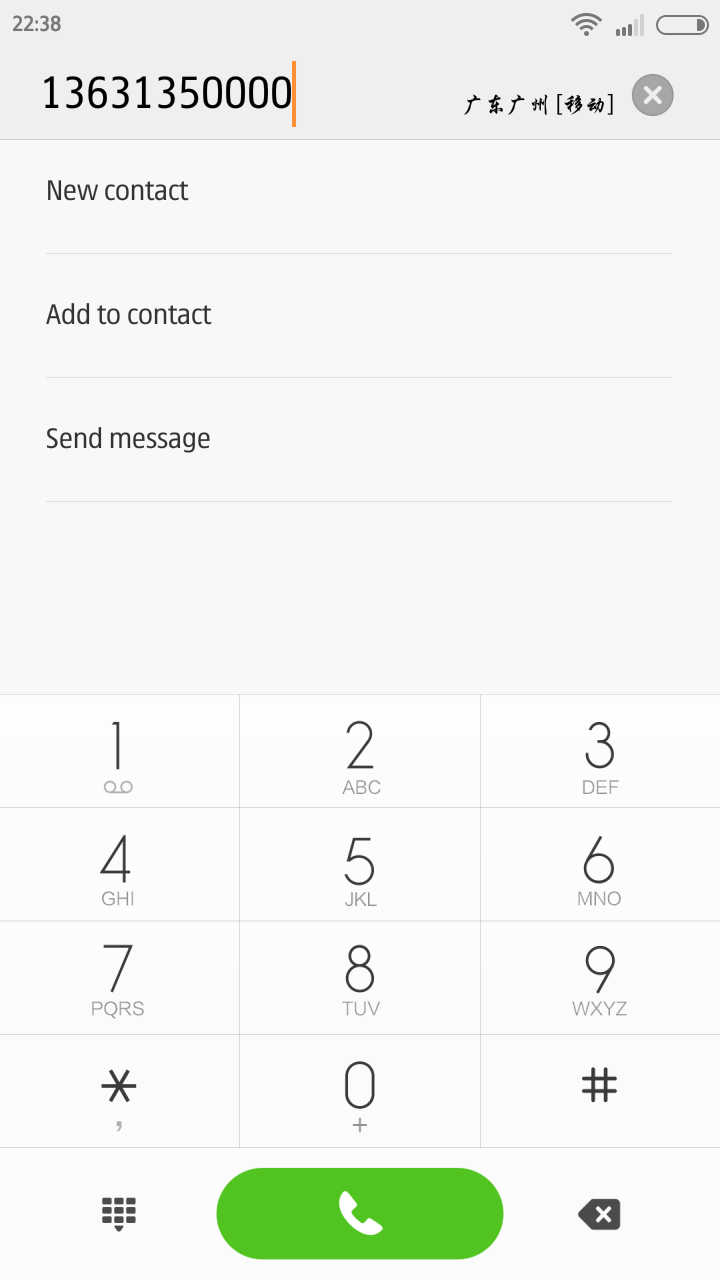
这里的归属地是中文显示的,原谅我不会换成拼音,凑合着用吧。
最后: 其实文章写给自己看的~ 纯备份
蛋疼的zeroclipboard js在本地运行不生效,我以为我哪里写错了呢 搞死人了,还好机灵,放在服务器上测试了
最简添加删除class:
// for test
function $(id){ return document.getElementById(id); }


// add or remove class
$('test1').onclick = function(){
    $('test2').className = /\s*on$/.test($('test2').className) ? 'test_class' : 'test_class on';
};
最简显示隐藏:
// for test
function $(id){ return document.getElementById(id); }


// display none or block
$('test1').onclick = function(){
    $('test2').style.display = $('test2').style.display == 'none' ? 'block' : 'none';
};
最简Tab切换:
<style>
        ul li{cursor: pointer;}
        div{display: none;}
        .on{border: 1px solid #ddd;}
        .on div{display: block;}
</style>


<ul id="x">
    <li>Tab1<div>content1</div></li>
    <li>Tab2<div>content2</div></li>
    <li>Tab3<div>content3</div></li>
</ul>


<script type="text/javascript">
document.getElementById('x').onclick = function(e){
    var w=window.event,t=(e||w).target||w.srcElement,c='className',x=this.x;
    x?x[c]='':0;tthis.x=t;t[c]='on';
};
</script>
Via 最小化DEMO测试代码
/**
 * WordPress 媒体库只显示用户自己上传的文件
 */
//在文章编辑页面的[添加媒体]只显示用户自己上传的文件
function my_upload_media( $wp_query_obj ) {
    global $current_user, $pagenow;
    if( !is_a( $current_user, 'WP_User') )
        return;
    if( 'admin-ajax.php' != $pagenow || $_REQUEST['action'] != 'query-attachments' )
        return;
    if( !current_user_can( 'manage_options' ) && !current_user_can('manage_media_library') )
        $wp_query_obj->set('author', $current_user->ID );
    return;
}
add_action('pre_get_posts','my_upload_media');


//在[媒体库]只显示用户上传的文件
function my_media_library( $wp_query ) {
    if ( strpos( $_SERVER[ 'REQUEST_URI' ], '/wp-admin/upload.php' ) !== false ) {
        if ( !current_user_can( 'manage_options' ) && !current_user_can( 'manage_media_library' ) ) {
            global $current_user;
            $wp_query->set( 'author', $current_user->id );
        }
    }
}
add_filter('parse_query', 'my_media_library' );